Peerfold PRM
A partner program that runs on your CRM records
PRM is the partner part of Peerfold. Partners sign in with the same emailed code your learners use and find their own area of your portal: they register a lead against a duplicate check that answers in one of five ways, work deals whose stage and amount stay your team's, pull the one-pager or price list their tier may have, and read a commission statement worked out on the day a deal was won. Tiers carry the rules, and eight permissions decide what each tier can reach. Every registration, stage move and payout lands on the CRM records your revenue team already reads. Peerfold keeps the ledger and moves no money: you pay the way you already do.
An add-on to any plan. Book a demo and we will switch it on for your workspace.
 Partner program
What it does
From a partner's first sign-in to a recorded payout
Four chapters, and the same cards the features index carries under the partner program.
Recruit
Partners with a portal of their own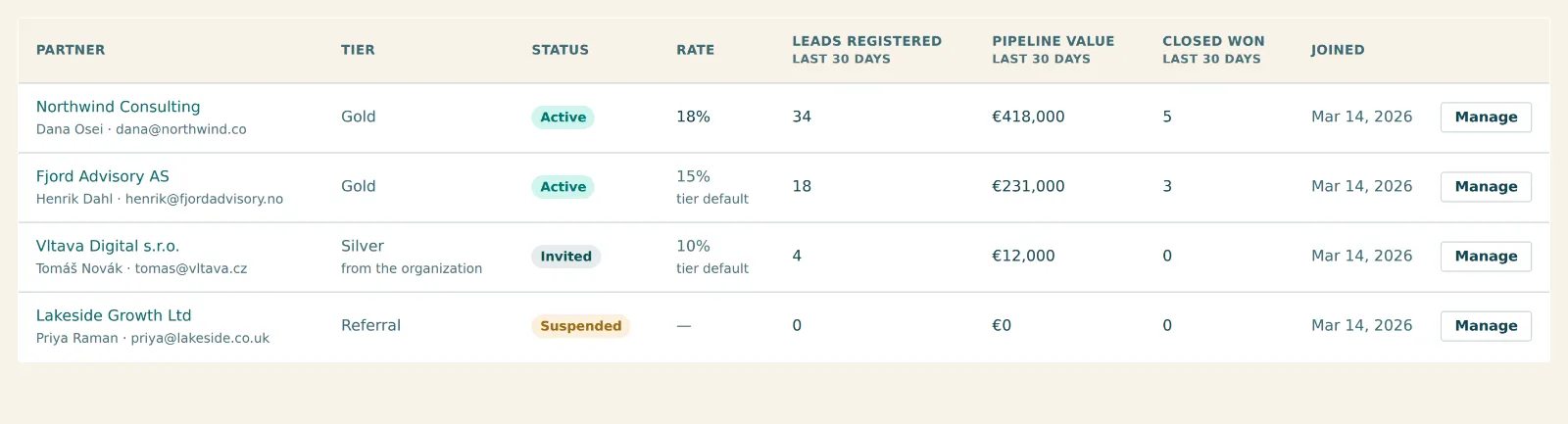
A partner area in your portal
They sign in with the same emailed code your learners use and find a Partner link in the header. Somebody who is not a partner never sees it.
Tiers
A default commission rate, the pipeline and entry stage their deals land in, the stages that mean won, and a deal-name template with a live preview.
Eight permissions
Registering leads, taking one, creating deals, typing amounts, earning commission, seeing the assets. A permission that is off removes the surface instead of locking it.
Companies, or people
One choice decides whether a partner's own tier wins or their organization's. The other stays the fallback, so nobody loses a tier when you switch.
Your own vocabulary
Partner reads as dealer, installer or reseller throughout, because the word your program already uses is the one they will recognize.
View as partner
Opens their portal read-only in a new tab and writes an audit entry. You see exactly what they see and can save nothing as them.
Register
Leads and deals that reach your CRM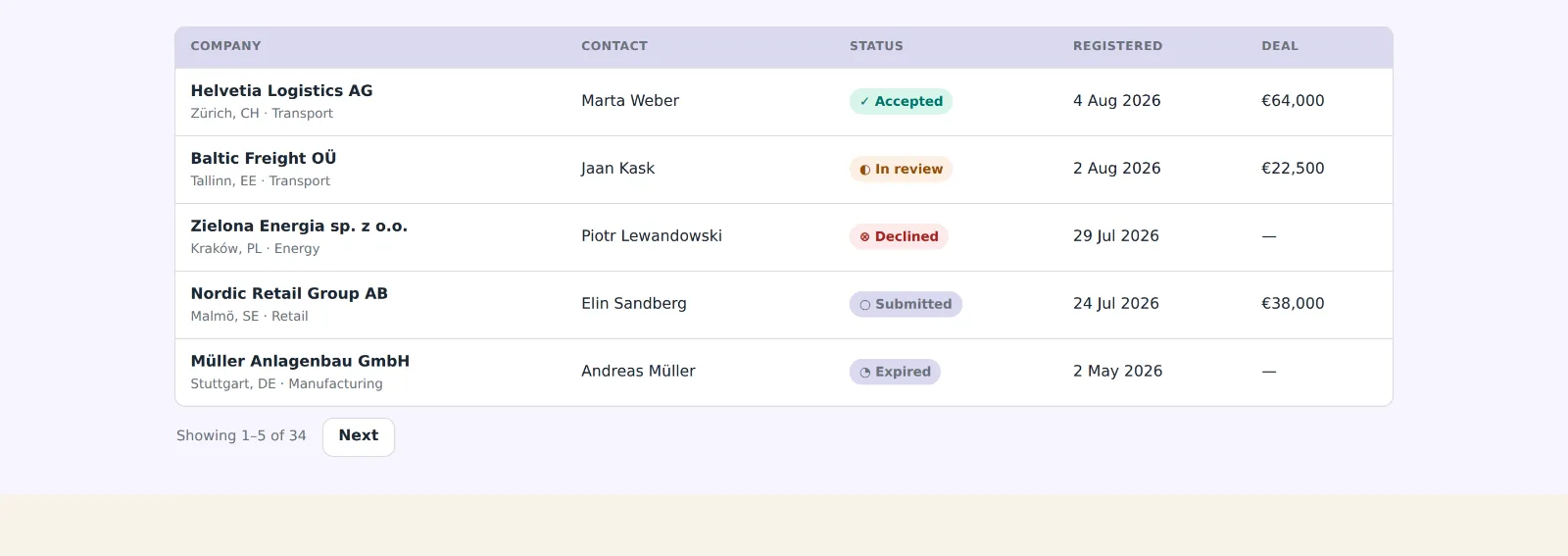
Register a lead
A partner registers a company and the duplicate check answers in one of five ways. Every refusal keeps what they typed and says what to do next.
Lead protection
The window is stamped at registration, so shortening it next quarter never reopens a claim somebody already made.
Your lead book
Every registration in the program. Set a status, hand it to another partner, or release it back to the pool, each logged with who did it.
Partner-sourced deals
Stage, amount and close date belong to your team. The partner's notes and forecast confidence belong to them and are never overwritten.
HubSpot in one press
The properties and associations the program writes to are added where they are missing and reported where they are not. Nothing is renamed or deleted.
Sync both ways
Your writes queue out; stage, amount, close date and owner come back every thirty minutes. The inbound pass only ever reads.
Pay
What they are owed, and the receipt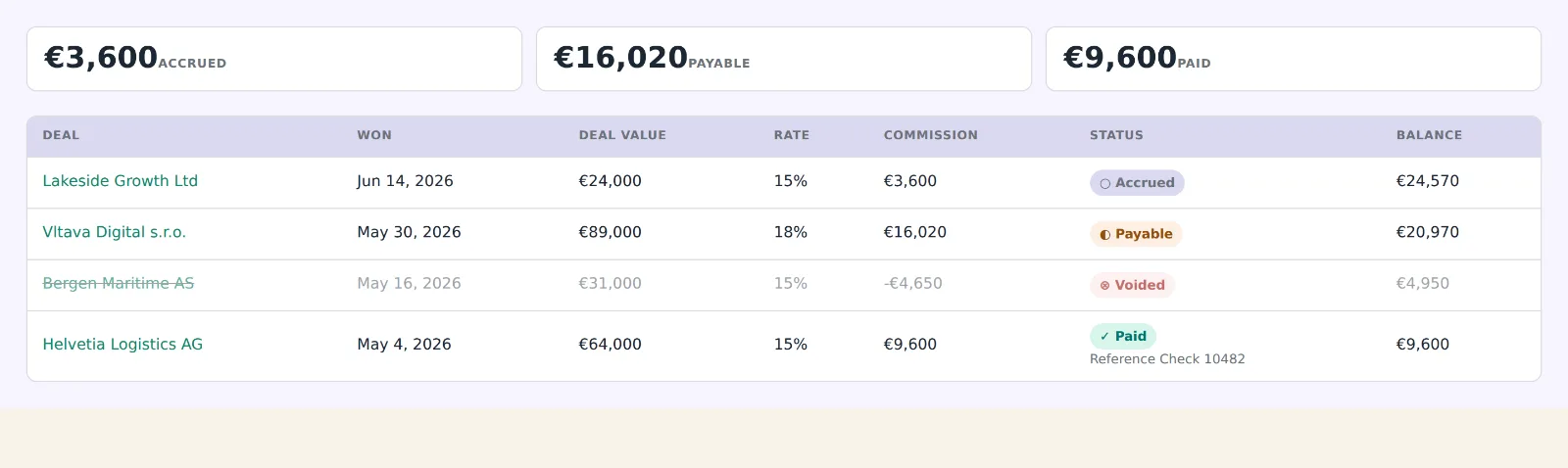
Eight figures, one answer
Leads, deals, pipeline, closed won, win rate and days to close over a window that lives in the address. Your partner's dashboard shows the same eight.
Worked out once
On the day a deal crosses a won stage, from the amount at that moment times the rate that answered. Changing a rate later rewrites nothing.
An append-only ledger
Accrued, payable and paid, plus a negative line when a won deal is un-won, so the running balance still adds up.
The partner's statement
Every line with its deal, its rate and where that rate came from. A tier that earns no commission has no such tab at all.
Payout runs
Approve, void with a reason, open a draft that reserves its lines, then record how you paid and the reference. A recorded run is a receipt and never changes.
Written back, never sent
Commission paid, its date and its amount land on the HubSpot deal. Peerfold keeps the ledger and moves no money: you pay the way you already do.
Equip
Something to hand out, and a link that says who sent them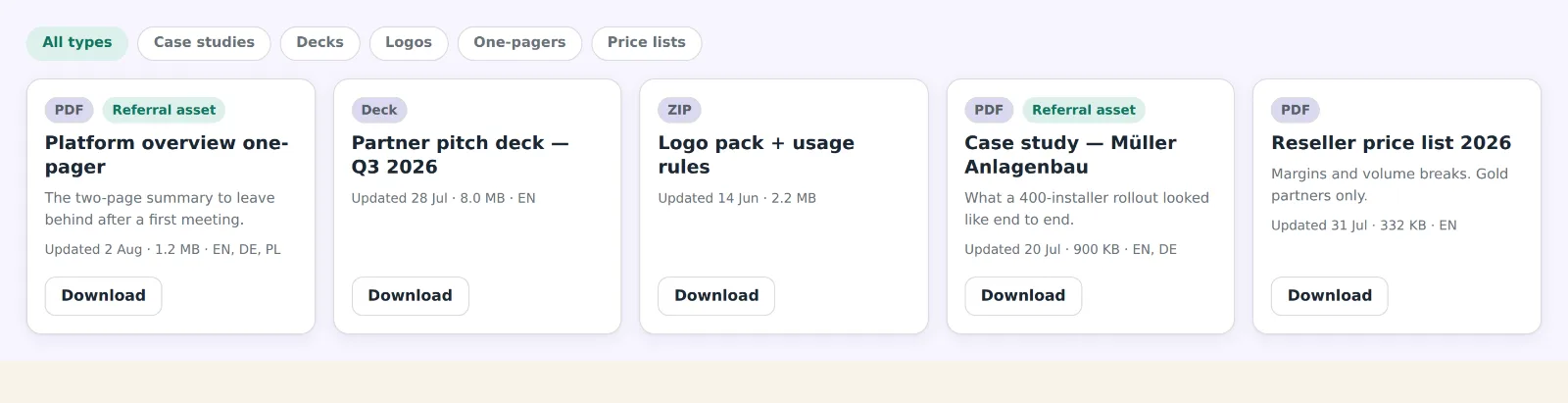
Asset library
One-pagers, decks, logo packs and price lists, as a file or a link, with tags that become the filter buttons above your partners' grid.
Gated on the server
An asset a partner may not have never reaches their browser, so a Gold-only price list cannot be found by a Silver partner who knows where to look.
Referral links
One per partner, plus extra links aimed at a particular page, each counting its own clicks and signups so they can tell which is working.
One script tag
Installed once on your marketing site. It sets no cookies, and nothing is credited until your own form hands it an email address.
A lead beats a click
Where another partner's protection window is still running, the signup is recorded as not attributed with the reason on the row.
The partner program is an add-on to any plan. It has no API or agent tools of its own yet, and no theme importer, so nothing above claims either.
Keep reading
The other two products, the plans, and the pages written for one reader at a time.
All three products in one scroll, with the partner program under the academy and the community.
The four published plans this add-on sits on, and what the trial includes.
The production economics, read by somebody deciding whether a channel is worth running.
Certify the partners you recruit here, on the same portal and the same sign-in.
A room where partners and customers answer each other, on one member identity.
Give your partners somewhere to work
A roster, tiers, lead registration and a commission ledger, inside the portal you already run.
- Fourteen-day trial, every feature on
- No card to start
- Leads, deals and payouts on your CRM records
- The ledger stays here, the payment stays yours